

Before we start, shoutout to a platform we built for YOU!
💎 Your next level in cybersecurity isn’t a dream, it’s a proactive roadmap.
HADESS AI Career Coach turns ambition into expertise:
→ 390+ clear career blueprints from entry-level to leadership
→ 490+ in-demand skill modules + practical labs
→ Intelligent AI(Not AI buzz, applied AI, promise!) tools + real-world expert coaches and scenarios
Master the skills that matter. Land the roles that pay. Build the future you want.
🔥 Start engineering your career →
https://career.hadess.io
KSF-00 · How To Use This Deck

The Mental Model
Each card is one concept, one diagram, one drill. Read the Mental Model, then the maps, then run the Hands On commands against a throwaway cluster, then answer the four Situational Awareness questions out loud before checking Recall. Once those four questions are second nature for every layer, reasoning about a new CVE takes minutes instead of an afternoon.
The Study Loop

How Each Card Is Built
Every card from KSF-01 to KSF-15 uses the same eight sections so you build a habit, not a hunt:
Card Reference table with 12 attributes (Card ID, Category, Difficulty, Tags, CIS Benchmark, MITRE ATT&CK, CVE Anchors, Tools On Deck, Blast Radius If Lost, Detect With, Common Pitfall, Time to Grok).
The Mental Model: a short narrative, written like a senior engineer explaining at a whiteboard.
Component / concept map: a mermaid
flowchartshowing how the pieces wire up.Sequence diagram: a mermaid
sequenceDiagramwhen there is a real flow (request, attack, reconcile).Hands On: real YAML and
kubectlcommands you can paste into a cluster.Situational Awareness: a 4-row table that always asks the same four questions.
Field Note: an applied anecdote, the thing that bites you in production.
Concepts This Card Touches: cross-links to other cards and to sub-concepts.
Recall: a two-column Q to A table with the answers visible, for self-testing.
The Four Situational Awareness Questions
These are the spine of the deck. Memorize them; they work for any new technology, not just Kubernetes.

Answer all four for any layer and the docs become reference material, not memorisation.
Three Routes Through the Deck

A One-Time Bootstrap
# a throwaway cluster you are allowed to break
kind create cluster --name ksf --image kindest/node:v1.32.0

# operator tooling
brew install k9s
( set -x; kubectl krew install neat tree who-can access-matrix view-secret rbac-lookup )

# posture scanner used in KSF-15
go install github.com/raesene/eathar@latest

# baseline scan, save the output
eathar baseline -k ~/.kube/config | tee /tmp/eathar-baseline.txt
Keep that cluster around. Every Hands On block in the deck assumes you can paste into something you do not mind destroying.
What This Deck Will Not Do For You
It will not memorize the cards on your behalf. The Recall tables only work if you cover the right column first.
It will not replace CIS Kubernetes Benchmark, the upstream docs, or the actual KEPs. It indexes them.
It will not stay current forever. Versions cited are accurate as of the time of writing; verify before you cite a graduation version in a customer report.
What Comes Next
Open the Index in README.md, pick a card by route or by gap, and run the loop. When you have done five cards, read the cheatsheet to see how they fit together. When you have done all fifteen, read the final review to lock the spine of the deck in.
Page 2 of 18 · Cluster, Caught
KSF-01 · The Control Plane, and Why etcd Sleeps With One Eye Open
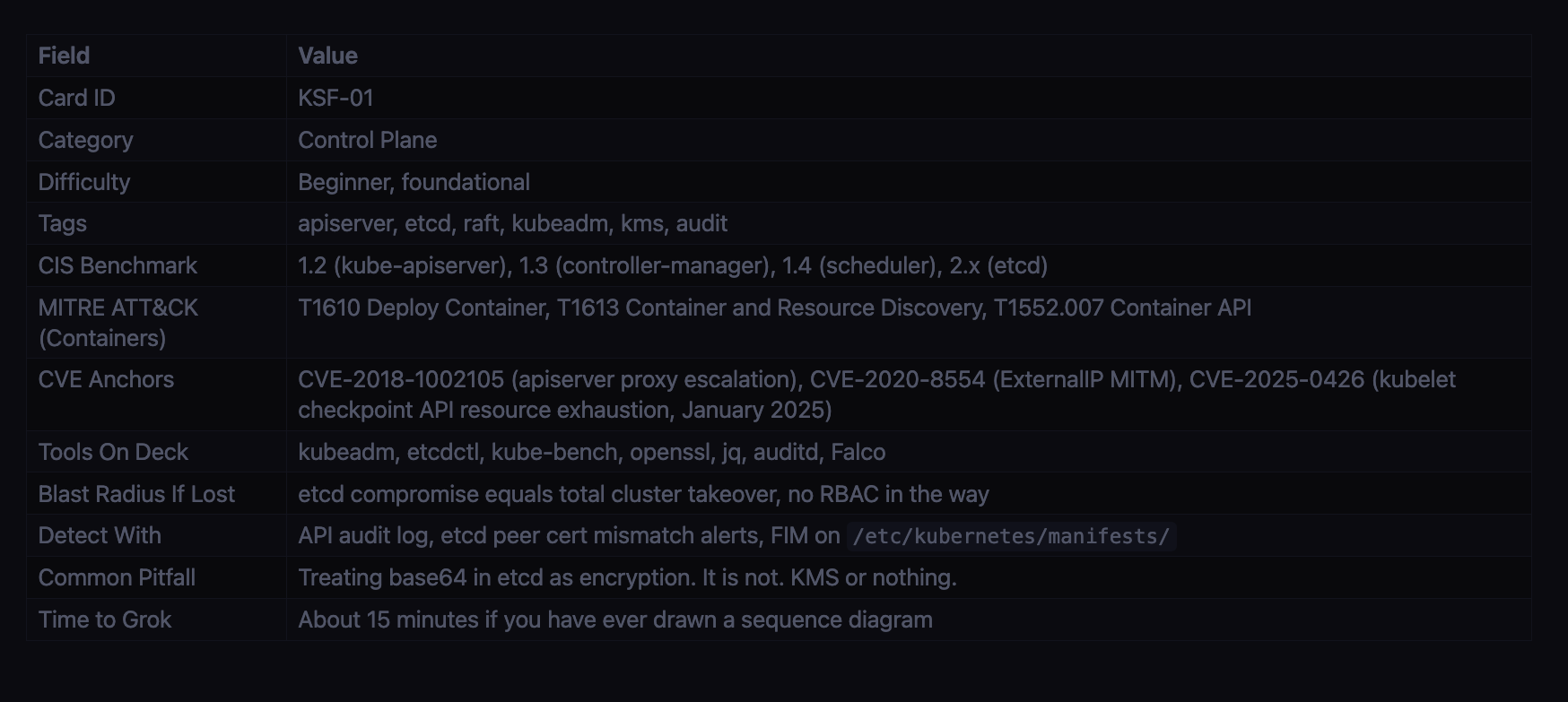
The Mental Model
The control plane has four daemons. The API server is the only entry point: every kubectl call, every controller reconcile, every webhook hits it first. The controller manager runs the reconciliation loops that drag actual state toward declared state. The scheduler binds Pods to Nodes. The cloud controller manager handles provider-specific bits like load balancers and node lifecycles on AWS, GCP, and Azure. All four read and write a single store: etcd. Only the API server holds an etcd client cert. Anything that talks to etcd directly bypasses authn, authz, admission, and audit in one step.
Component Map

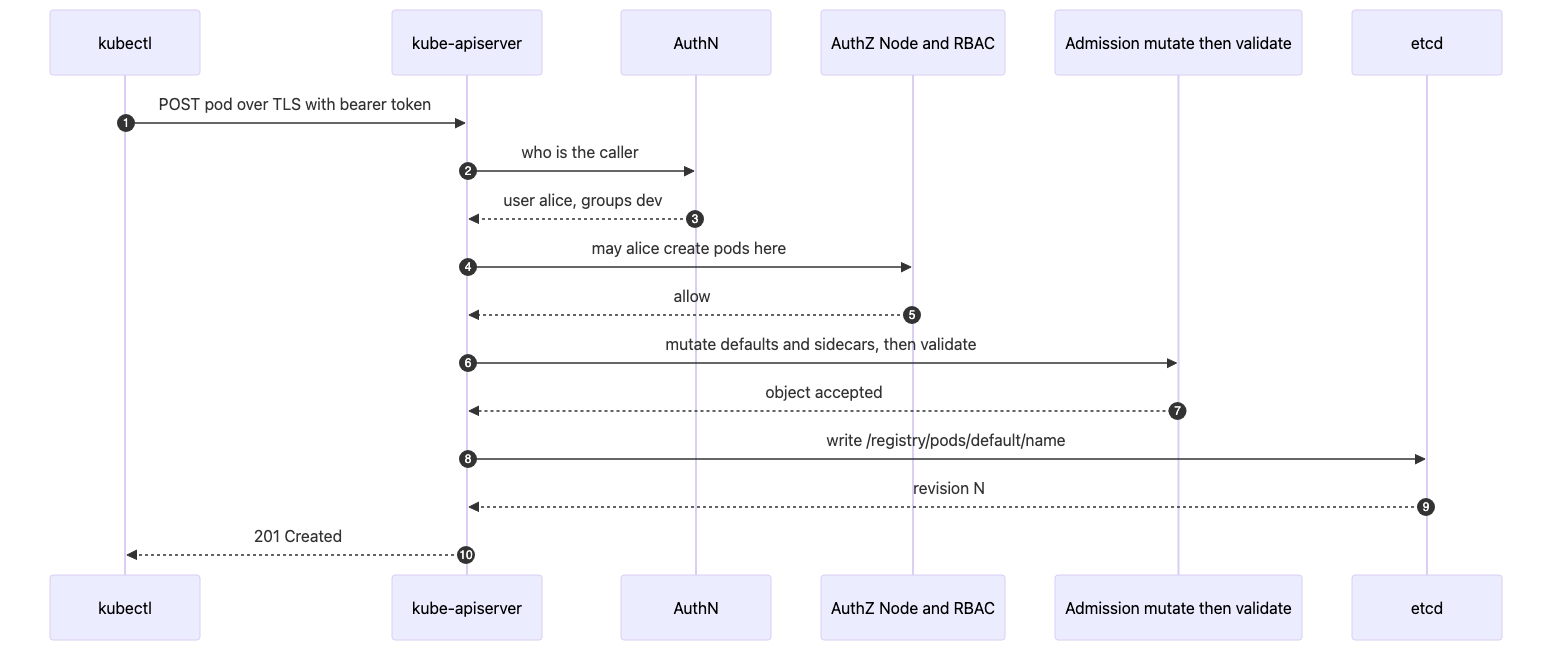
Request Lifecycle (every K8s control sits on one of these arrows)
Files and Ports Worth Memorizing
Asset Where If an attacker has it API server TCP 6443 the entire API, gated by AuthN and AuthZ etcd client / peer TCP 2379 / 2380 game over, read or write any object kubelet TCP 10250 exec into any pod on that node Cluster CA /etc/kubernetes/pki/ca.{crt,key} forge any client cert, any identity SA signing key /etc/kubernetes/pki/sa.key mint cluster-admin SA tokens offline Static pod dir /etc/kubernetes/manifests/ drop a YAML, kubelet runs it, RBAC is bypassed Admin kubeconfig /etc/kubernetes/admin.conf walk in as kubernetes-admin
Hands On
Safer kube-apiserver flags (kubeadm static pod, trimmed to the security relevant ones):
spec:
  containers:
  - command:
    - kube-apiserver
    - --anonymous-auth=false
    - --authorization-mode=Node,RBAC
    - --enable-admission-plugins=NodeRestriction,PodSecurity,ValidatingAdmissionPolicy
    - --encryption-provider-config=/etc/kubernetes/enc/enc.yaml
    - --audit-log-path=/var/log/kubernetes/audit.log
    - --audit-policy-file=/etc/kubernetes/audit-policy.yaml
    - --service-account-issuer=https://kubernetes.default.svc
    - --api-audiences=https://kubernetes.default.svc
    - --tls-min-version=VersionTLS12
    - --profiling=false
Real encryption at rest for Secrets, KMS v2 (GA since v1.29):
apiVersion: apiserver.config.k8s.io/v1
kind: EncryptionConfiguration
resources:
  - resources: ["secrets", "configmaps"]
    providers:
      - kms:
          apiVersion: v2
          name: cluster-kms
          endpoint: unix:///var/run/kmsplugin/socket.sock
          timeout: 3s
      - identity: {}
Three commands to run before you trust the cluster:
ps -ef | grep kube-apiserver | tr ' ' '\n' | grep anonymous-auth   # must print =false
curl -k https://NODE_IP:10250/pods                                  # must return 401
kube-bench run --targets=master,etcd --benchmark cis-1.9            # aim for zero FAILs
Situational Awareness (the four questions to ask every time)
Question Answer for this layer Where am I? Inside the control plane trust boundary. Everything here is root on a Linux box and a peer of etcd. If you are on a worker, you are not here yet; you only see the API server over :6443. What am I looking for? The four crown jewels: /etc/kubernetes/pki/sa.key (mint tokens), /etc/kubernetes/pki/ca.key (forge identities), /etc/kubernetes/admin.conf (walk in as admin), and direct etcd access on :2379 (read every Secret). Who can access here? Operators with SSH to the control plane host, anyone with a kubeconfig referencing this cluster, in-cluster pods presenting a ServiceAccount token, the kubelets via mTLS, and the controller manager and scheduler via their own client certs. Anonymous users only if --anonymous-auth=true, which should be false. Where can I go from here? Down to every worker via kubectl exec or kubelet :10250, sideways into every namespace by minting a SA token with sa.key, out to the cloud account via cloud-controller-manager IAM, and persistently by dropping a static pod manifest into /etc/kubernetes/manifests/.
Field Note
A Friday afternoon EKS audit found ClusterRoleBinding/cluster-admin bound to system:unauthenticated. Nobody had done it on purpose. A prior engineer had pasted a “fix” from a forum. Anyone on the internet who could reach the API endpoint could kubectl get secrets as admin. The fix was one kubectl delete clusterrolebinding, but the discovery took an audit log review going back ninety days. The lesson: the control plane is mostly fine by default; humans are the failure mode.
Concepts This Card Touches
AuthN of the caller, going into KSF-02 Authentication
AuthZ stage, going into KSF-03 RBAC and Node Authorizer
Admission stage, going into KSF-04 Admission Control (PSA, ValidatingAdmissionPolicy with CEL, Kyverno, Gatekeeper)
Encryption of objects on the etcd write, going into KSF-05 Secrets and KMS
Kubelet on :10250 and node hardening, going into KSF-07 Node and Runtime
Built ins to recognize: Raft consensus, leader election leases, scheduling framework plugins, projected service account tokens (BoundServiceAccountTokenVolume, GA in v1.22), aggregated discovery (GA in v1.30)
Recall (answers included, cover the right column with your hand)
Prompt Straight Answer The only client of etcd is... kube-apiserver. Everything else talks to the API server. The signer of every ServiceAccount JWT is... kube-controller-manager, using /etc/kubernetes/pki/sa.key. Order of the five enforcement stages for POST /pods. TLS termination, AuthN, AuthZ, Admission (mutating then validating), persist to etcd. etcd ports and the flag that makes mTLS mandatory. 2379 client, 2380 peer, --client-cert-auth=true and --peer-client-cert-auth=true. Why base64 in etcd is not encryption, and the fix. Anyone with etcd read access can decode it in one command. Use EncryptionConfiguration with a kms provider (v2). Drop a YAML into /etc/kubernetes/manifests/. What happens. The kubelet reconciles that dir roughly every 20 seconds and starts the pod. RBAC and admission are bypassed. Treat the path as a crown jewel. The CVE that proved the API server’s reverse proxy could be turned into privilege escalation. CVE-2018-1002105. Lose sa.key, regain it... You do not. Rotate the signing key, invalidate outstanding tokens, then hunt.
Page 3 of 18 · Cluster, Caught
