


It was 3:17 AM when Sarah’s phone exploded with alerts. Their production infrastructure built meticulously with Nix for reproducibility was exhibiting anomalous behavior. As the DevSecOps lead managing 40+ microservices across Kubernetes clusters, she’d championed Nix adoption precisely to eliminate the “works on my machine” chaos that plagued their CI/CD pipelines. Before Nix, their team burned 15 hours per week debugging version mismatches: Terraform 1.5 locally but 1.6 in CI, kubectl compiled against k8s 1.27 but production ran 1.28, Python builds failing because developer laptops had different OpenSSL versions than the container base images. Nix promised byte-for-byte reproducible builds same input always produces same output, regardless of when or where you build.
Yet here they were at 3 AM: containers spawning cryptocurrency miners, exfiltrating AWS credentials through DNS tunnels, and worst of all the flake.lock file had been poisoned. The attack bypassed all their security controls: signed container images, network policies, admission controllers. Because the malicious code was baked into the Nix derivation itself, it appeared legitimate to every scanning tool in their security stack.
The irony stung. Nix’s hermetic builds and content-addressed storage were supposed to prevent exactly this scenario. But as Sarah would soon discover, attackers had evolved their techniques specifically to target Nix’s trust model exploiting the very features that made builds reproducible. This is the story of how they weaponized reproducibility itself, and how DevOps engineers must architect their infrastructure pipelines to defend against supply chain attacks in the Nix ecosystem.
The Double-Edged Sword: Understanding Nix’s Security Paradigm
Why Nix Changed Everything
Traditional package managers suffer from environmental drift the same Dockerfile produces different containers on different days. Nix eliminates this with:
Content-addressed store (
/nix/store/HASH-package-version)Flake.lock pinning (exact git commits, not semantic versions)
Hermetic builds (no network access during build)
Immutable packages (store paths never change)
But these strengths become attack surfaces when misunderstood or misconfigured.
Section 1: Insecure Architecture - The Attacker’s Playground
The Vulnerable Nix Pipeline
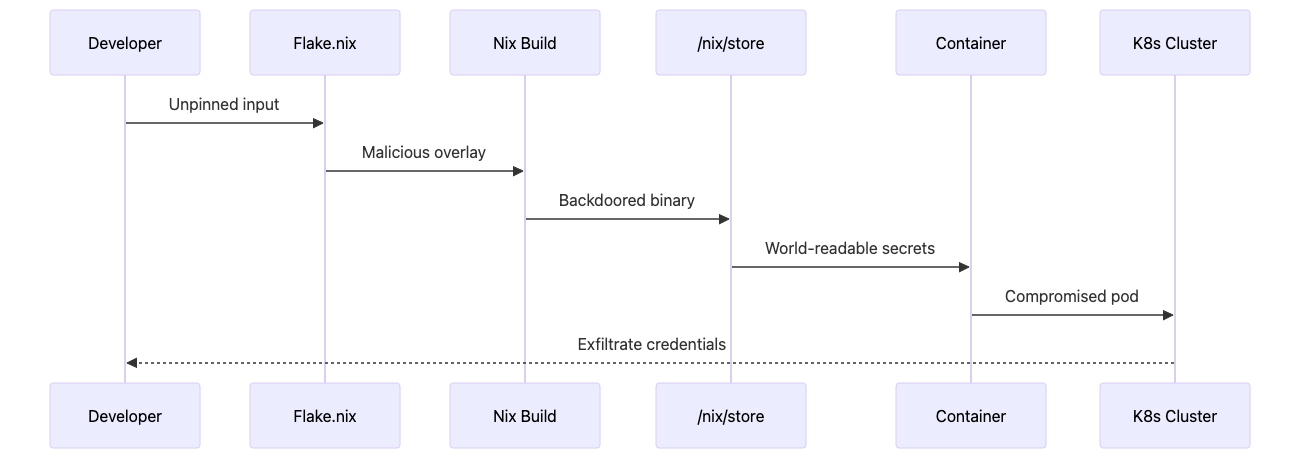
Critical Weaknesses:
World-readable store (
/nix/storeisdr-xr-xr-x) - Anyone with shell access can enumerate all installed packages, their versions, build scripts, and potentially embedded credentials. This is by design for Nix’s content-addressed storage, but becomes dangerous when developers don’t understand the implications.Unverified flake inputs (no signature verification by default) - When you write
nixpkgs.url = “github:NixOS/nixpkgs/nixos-24.05”, Nix trusts GitHub’s infrastructure entirely. No cryptographic verification happens unless you explicitly enable it. An attacker compromising GitHub or performing MITM can inject malicious code.Build-time network access (FODs - Fixed Output Derivations) - Certain packages need to fetch from the internet during build. These “fixed output derivations” are security holes where an attacker controlling upstream sources can inject malware. The hash verification only checks the final output, not what happened during the build process.
Substituter trust (binary caches without validation) - The default
cache.nixos.orgworks over HTTPS, but if someone misconfiguresnix.confto use HTTP or disables signature verification withrequire-sigs = false, every binary becomes a potential trojan horse.Secrets in store (environment variables end up in
/nix/store) - This catches DevOps engineers constantly, especially when migrating from Docker where environment variables are runtime-injected. You setAPI_KEY = “sk_live_abc123”in a GitHub Actions workflow or define it in your flake’sshellHook, thinking it’s just build-time configuration. But Nix evaluates everything at build time, embeds it in a derivation path like/nix/store/abc123-env-vars, and now your production database password is readable by every container, every user, every process on the system. Even worse: it persists forever because garbage collection won’t remove it if any other derivation references it. In CI/CD environments where the Nix store is cached and reused across pipeline runs, this means secrets from six months ago are still accessible to attackers compromising today’s builds. The proper solution—sops-nix runtime secret injection—is non-obvious to teams coming from traditional deployment models where secrets are environment variables passed at container startup.Timestamp manipulation - Nix sets all timestamps to epoch (Jan 1, 1970) for reproducibility. While this ensures builds are deterministic, it also means forensic investigation becomes harder. You can’t tell when a package was actually built just by looking at filesystem metadata.
Transitive dependencies - Flake inputs can have their own inputs. If you depend on
flake-utils, andflake-utilsdepends on something else, you’re trusting that entire chain. An attacker compromising any link in that chain can inject code into your build.
Nix for DevOps Engineers: Why This Matters for Your Infrastructure
The DevOps Pain Points Nix Solves
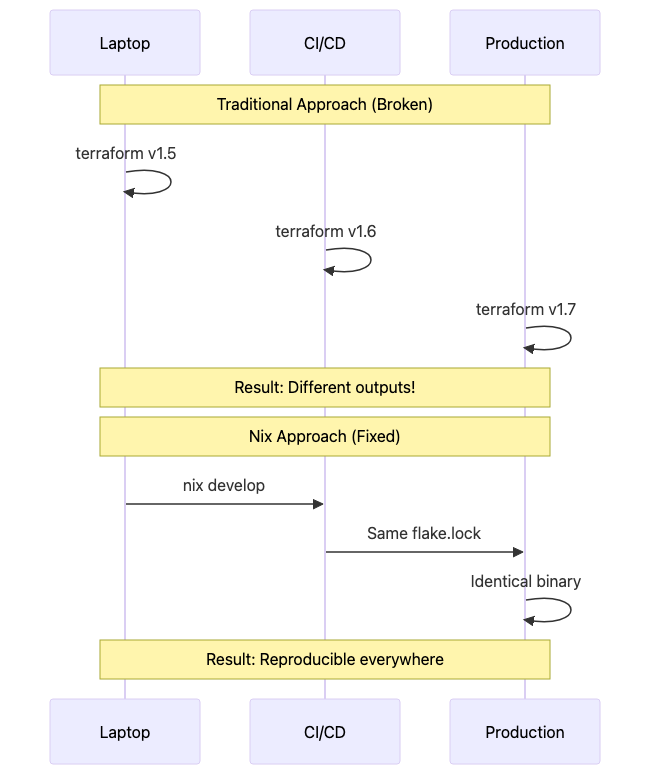
Before diving into attacks and defenses, understand why DevOps teams adopt Nix and where it fits in modern infrastructure:
Problem 1: CI/CD Environment Drift
Your GitHub Actions workflow runs terraform apply successfully, but when the same code runs in Jenkins, it fails because Jenkins has Terraform 1.5.7 while GitHub Actions provides 1.6.2. Provider APIs changed between versions, and now your infrastructure deployment is blocked. Traditional solutions—Docker containers for CI, mise/asdf for local dev, apt-pinning for servers—create three different package management systems to maintain.
Nix solution: one flake.nix defines your exact toolchain. Developers run nix develop, GitHub Actions runs nix develop --command terraform apply, production NixOS servers use the same pinned derivations. Everyone gets Terraform 1.6.2 from the exact same nixpkgs commit, down to the same linked OpenSSL libraries and libffi versions.
Problem 2: Container Base Image Vulnerabilities
Your security team demands you patch CVE-2024-12345 in libssl. You rebuild all containers with FROM ubuntu:22.04 expecting the latest security updates. But Ubuntu’s package mirror was synced at different times across your build infrastructure. Three containers get the patched version, two don’t. Your container registry shows five images with identical tags but different SHA256 digests. Which ones are actually patched?
Nix solution: dockerTools.buildLayeredImage creates containers with no base image. Just your application and its exact dependencies from /nix/store. The resulting 23MB container has zero packages you didn’t explicitly declare, zero inherited CVEs from base images, and scans show Total: 0 vulnerabilities because there’s no bash, no apt, no unnecessary attack surface.
Problem 3: “Works on My Machine” Kubernetes Manifests
Your team maintains 200+ Kubernetes YAML files. A developer edits deployment.yaml and changes containerPort: 8080 but forgets to update the corresponding service.yaml where it says targetPort: 8081. The manifest passes kubectl apply --dry-run locally because their cluster already has the old service, but it breaks in production during deployment causing 20 minutes of downtime.
Nix solution: nixidy generates Kubernetes manifests from Nix code with full type checking. If you typo containerPort as containrPort, Nix evaluation fails immediately with “attribute ‘containrPort’ does not exist”. Port numbers are variables used consistently across deployments and services. ArgoCD syncs the generated YAML, knowing every manifest was validated at build time.
Integrating Nix into Your Existing DevOps Stack
You don’t rewrite everything. Here’s the pragmatic adoption path:
Week 1: Development Environments
Create flake.nix for your infrastructure repository:
{
  inputs.nixpkgs.url = “github:NixOS/nixpkgs/nixos-24.05”;

  outputs = { nixpkgs, ... }: {
    devShells.x86_64-linux.default = let
      pkgs = nixpkgs.legacyPackages.x86_64-linux;
    in pkgs.mkShell {
      packages = with pkgs; [
        # pin exact versions for consistency
        terraform_1_6    # not latest, not 1.5, exactly 1.6.x
        kubectl          # from nixos-24.05 snapshot
        kubernetes-helm  # same version for everyone
        awscli2          # no more pip install --user
        python311        # explicit python version
        nodejs_20        # explicit node version

        # security scanning in dev
        trivy
        grype
        tfsec

        # custom deployment script
        (writeScriptBin “deploy-infra” ‘’
          #!/usr/bin/env bash
          set -euo pipefail

          echo “Deploying with pinned toolchain:”
          terraform version
          kubectl version --client

          # run security scans before deploy
          trivy config .
          tfsec . --soft-fail

          # actual deployment
          terraform init
          terraform plan -out=tfplan

          read -p “Apply? (yes/no): “ confirm
          if [ “$confirm” = “yes” ]; then
            terraform apply tfplan
          fi
        ‘’)
      ];

      shellHook = ‘’
        echo “=== DevOps Environment Activated ===”
        echo “Terraform: $(terraform version -json | jq -r .terraform_version)”
        echo “kubectl: $(kubectl version --client -o json 2>/dev/null | jq -r .clientVersion.gitVersion)”
        echo “Python: $(python --version | cut -d’ ‘ -f2)”
        echo “”
        echo “Run ‘deploy-infra’ to deploy with security checks”

        # fail-safe: verify critical versions
        TF_VERSION=$(terraform version -json | jq -r .terraform_version)
        if [[ ! “$TF_VERSION” =~ ^1\.6\. ]]; then
          echo “ERROR: Expected Terraform 1.6.x, got $TF_VERSION”
          exit 1
        fi
      ‘’;
    };
  };
}
Every developer runs nix develop (or set up direnv with use flake in .envrc for automatic activation). Your CI pipeline uses the identical command. Version drift: eliminated.
Week 2: CI/CD Pipeline Migration
Update .github/workflows/deploy.yml:
name: Deploy Infrastructure

on:
  push:
    branches: [main]
  pull_request:

jobs:
  deploy:
    runs-on: ubuntu-latest
    steps:
      - uses: actions/checkout@v4

      - uses: cachix/install-nix-action@v27
        with:
          extra_nix_config: |
            experimental-features = nix-command flakes
            sandbox = true
            require-sigs = true

      # critical: use binary cache to avoid rebuilding everything
      - uses: cachix/cachix-action@v14
        with:
          name: mycompany
          authToken: ‘${{ secrets.CACHIX_AUTH_TOKEN }}’

      # verify flake.lock integrity
      - name: Verify Dependencies
        run: |
          if [ ! -f flake.lock ]; then
            echo “CRITICAL: flake.lock missing”
            exit 1
          fi

          # check for unpinned inputs
          nix flake metadata --json | \
            jq -e ‘.locks.nodes | to_entries[] |
                    select(.value.locked.rev == null)’ \
            && echo “ERROR: Unpinned flake inputs” && exit 1 || true

      # run infrastructure deployment in nix environment
      - name: Deploy
        run: |
          nix develop --command bash -c ‘
            terraform init
            terraform plan -out=tfplan
            terraform apply -auto-approve tfplan
          ‘
        env:
          AWS_ACCESS_KEY_ID: ${{ secrets.AWS_ACCESS_KEY_ID }}
          AWS_SECRET_ACCESS_KEY: ${{ secrets.AWS_SECRET_ACCESS_KEY }}
First run takes 8 minutes compiling everything. Second run (thanks to cachix binary cache): 45 seconds. Every subsequent run: downloads pre-built binaries instead of compiling from source.
Week 3: Container Builds with Nix
Replace your Dockerfile with Nix:
# container.nix
{ pkgs ? import <nixpkgs> {} }:

let
  # your application
  app = pkgs.writeScriptBin “api-server” ‘’
    #!${pkgs.python311}/bin/python
    from flask import Flask
    app = Flask(__name__)

    @app.route(’/health’)
    def health():
        return {’status’: ‘healthy’}, 200

    if __name__ == ‘__main__’:
        app.run(host=’0.0.0.0’, port=8080)
  ‘’;
in
pkgs.dockerTools.buildLayeredImage {
  name = “company/api”;
  tag = “v1.0.0”;

  contents = [
    app
    pkgs.python311Packages.flask
    pkgs.cacert  # for HTTPS requests
  ];

  config = {
    Cmd = [ “${app}/bin/api-server” ];
    ExposedPorts = { “8080/tcp” = {}; };

    # security hardening
    User = “1000:1000”;
    WorkingDir = “/app”;
  };
}
Build and scan:
nix build -f container.nix
docker load < result

# 23MB image vs 200MB+ from ubuntu:22.04
docker images company/api
REPOSITORY    TAG       SIZE
company/api   v1.0.0    23MB

# zero vulnerabilities because no base image
trivy image company/api:v1.0.0
Total: 0 (CRITICAL: 0, HIGH: 0, MEDIUM: 0, LOW: 0)
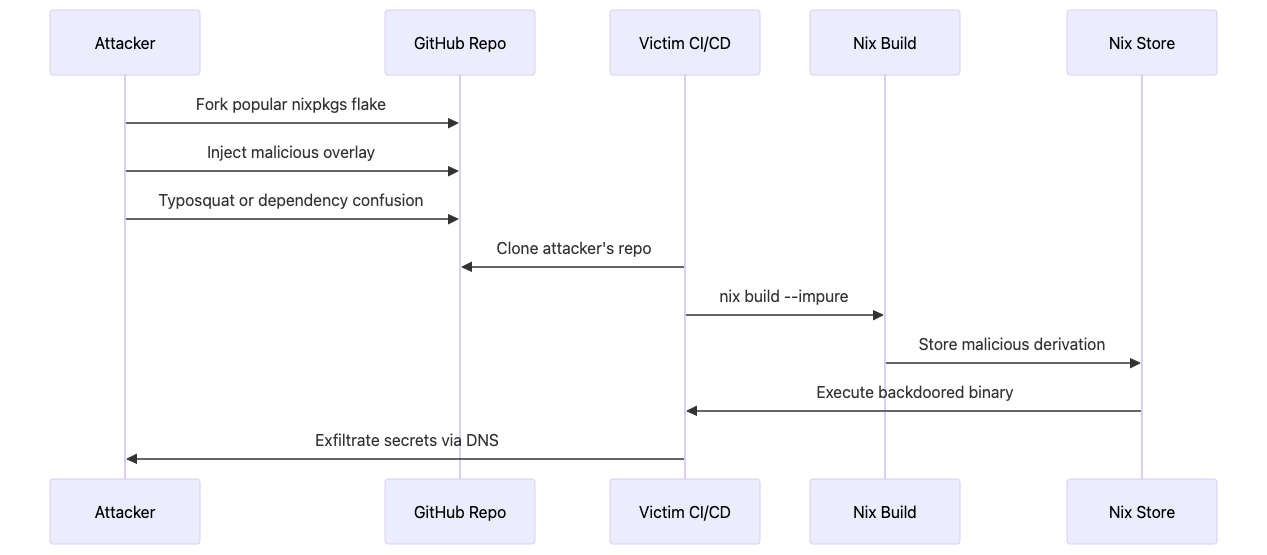
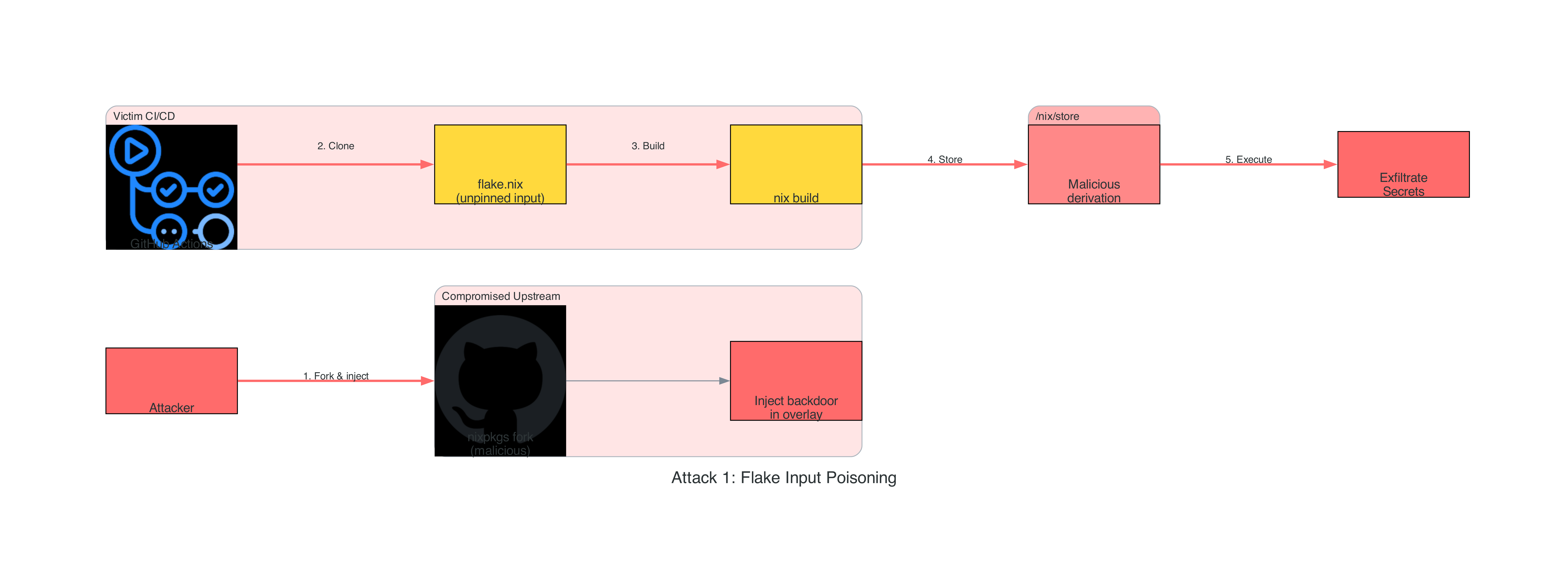
Attack Technique #1: Flake Input Poisoning (T1195.002 - Compromise Software Supply Chain)
Flake input poisoning exploits the trust relationship between Nix projects and their declared dependencies, targeting the weakest link in the supply chain: unpinned or unverified upstream repositories. When DevOps teams reference flake inputs using branch names or tags instead of immutable commit hashes, they create an attack window where compromised upstream maintainers or GitHub account takeovers can inject malicious code that propagates to every downstream build. This technique is particularly effective in CI/CD pipelines that run nix flake update automatically, environments using floating references like github:NixOS/nixpkgs/master, or teams that don’t commit flake.lock to version control, leaving every build vulnerable to supply chain compromise at evaluation time before any sandboxing occurs.
The Attack Vector
Practical Implementation
Attacker creates malicious flake:
